Top 10 Best Laptop Stands of 2026: Ranked & Reviewed
A $9 riser with 17,000 reviews. A standing desk converter that fits in a backpack. An aerospace-grade aluminum stand at $40. Your next desk upgrade is on this list.
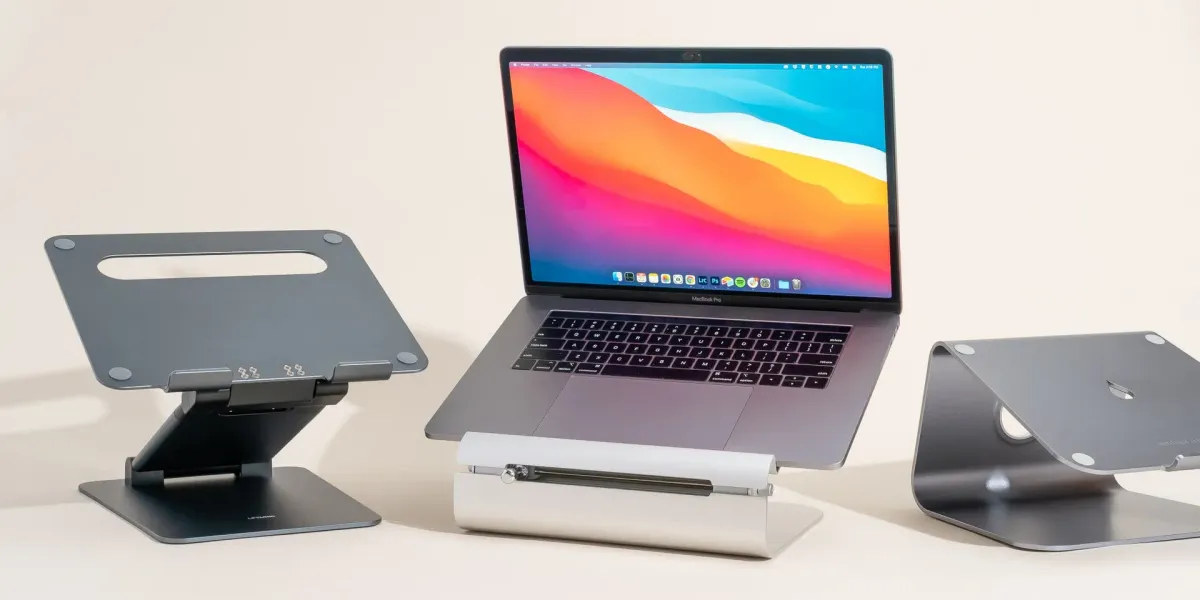
A laptop stand is four legs and a platform. The engineering isn't complicated. So why do some cost $9 and others push $80? Mostly materials, adjustability, and branding. Not always in that order. This list covers the best laptop stands of 2026 across every price, form factor, and use case worth caring about. The Bestand Aluminum Cooling Stand (#1) uses aerospace-grade aluminum at a price that makes most competitors feel opportunistic. But if you need standing-desk height, a vertical dock, or something that folds into a backpack, the right pick might sit further down the list.
| # | Product | Price | Rating | |
|---|---|---|---|---|
| #1 | Bestand Aluminum Cooling Stand | $39.99 | 4.8/5 | View Deal |
| #2 | Lifelong UPRYZE Extra Tall Stand | $69.99 | 4.8/5 | View Deal |
| #3 | Psitek Aluminum Vertical Dock | $16.99 | 4.8/5 | View Deal |
| #4 | Lamicall Adjustable Laptop Stand | $35.99 | 4.7/5 | View Deal |
| #5 | Rain Design mStand | $39.90 | 4.7/5 | View Deal |
| #6 | Native Union Desk Laptop Stand | $79.99 | 4.6/5 | View Deal |
| #7 | Tonmom Adjustable Laptop Riser | $8.99 | 4.5/5 | View Deal |
| #8 | Amazon Basics Ergonomic Laptop Stand | $45.95 | 4.5/5 | View Deal |
| #9 | Branch Adjustable Wooden Stand | $79.00 | 4.5/5 | View Deal |
| #10 | Rain Design iLevel 2 | $58.40 | 4.4/5 | View Deal |
#1. Bestand Laptop Stand Aluminum Cooling Computer Stand Holder
6000-series aluminum is fine. 7000-series aerospace aluminum at $40 is hard to beat.
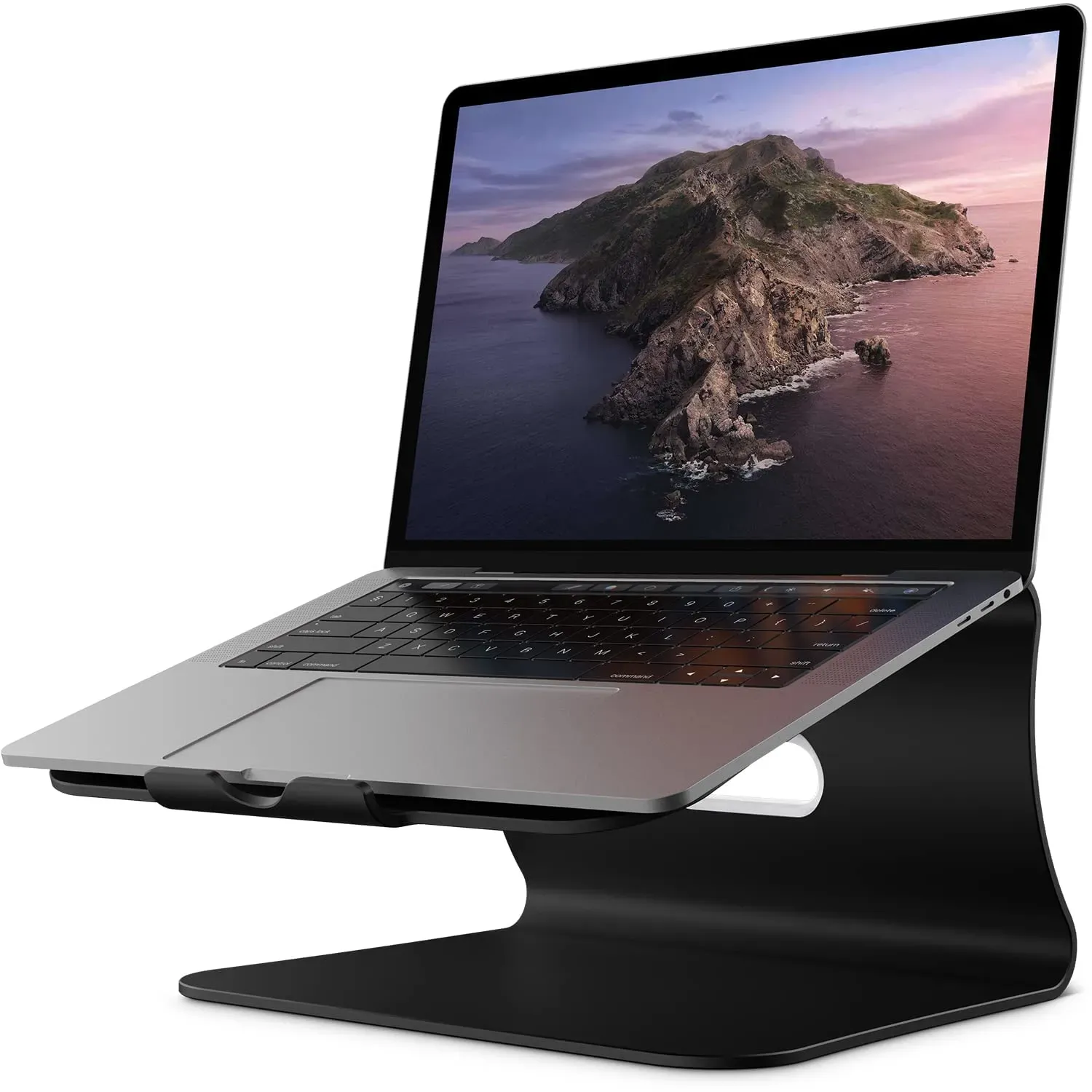
Price: $39.99 Rating: 4.8/5 Best For: Cooling-Focused Users Check Price on Amazon
Most laptop stands in the $30 to $40 range use 6000-series aluminum. The Bestand uses 7000-series, the stuff found in aircraft frames. It resists bending and corrosion better than anything at this price. At 4mm thick with a 66-pound load rating, it feels almost comically overbuilt for holding a 3-pound ultrabook. The real payoff is thermal: that dense aluminum pulls heat out of your laptop chassis, and the hollow ventilation design keeps air moving under load. Compared to the Rain Design mStand (#5), you lose the cable management hole and color options, but gain wider compatibility and a noticeably cooler-running machine. If you only buy one stand off this list, this is the one.
Pros
- 7000-series aerospace-grade aluminum alloy
- 4mm thickness with 66-pound load-bearing capacity
- Hollow ventilation design for active heat dissipation
- Silicone pads on top surface, front lip, and bottom
- Compatible with 11 to 16 inch laptops across all major brands
Cons
- Fixed height, no adjustability at all
- Limited to 16-inch laptops; 17-inch users are out of luck
- No cable management routing
Verdict: The best all-around laptop stand for anyone who wants premium materials and thermal performance without paying a premium price. Skip it only if you need adjustable height.
#2. Lifelong Aluminum Adjustable Laptop Stand Extra Tall 20" Riser
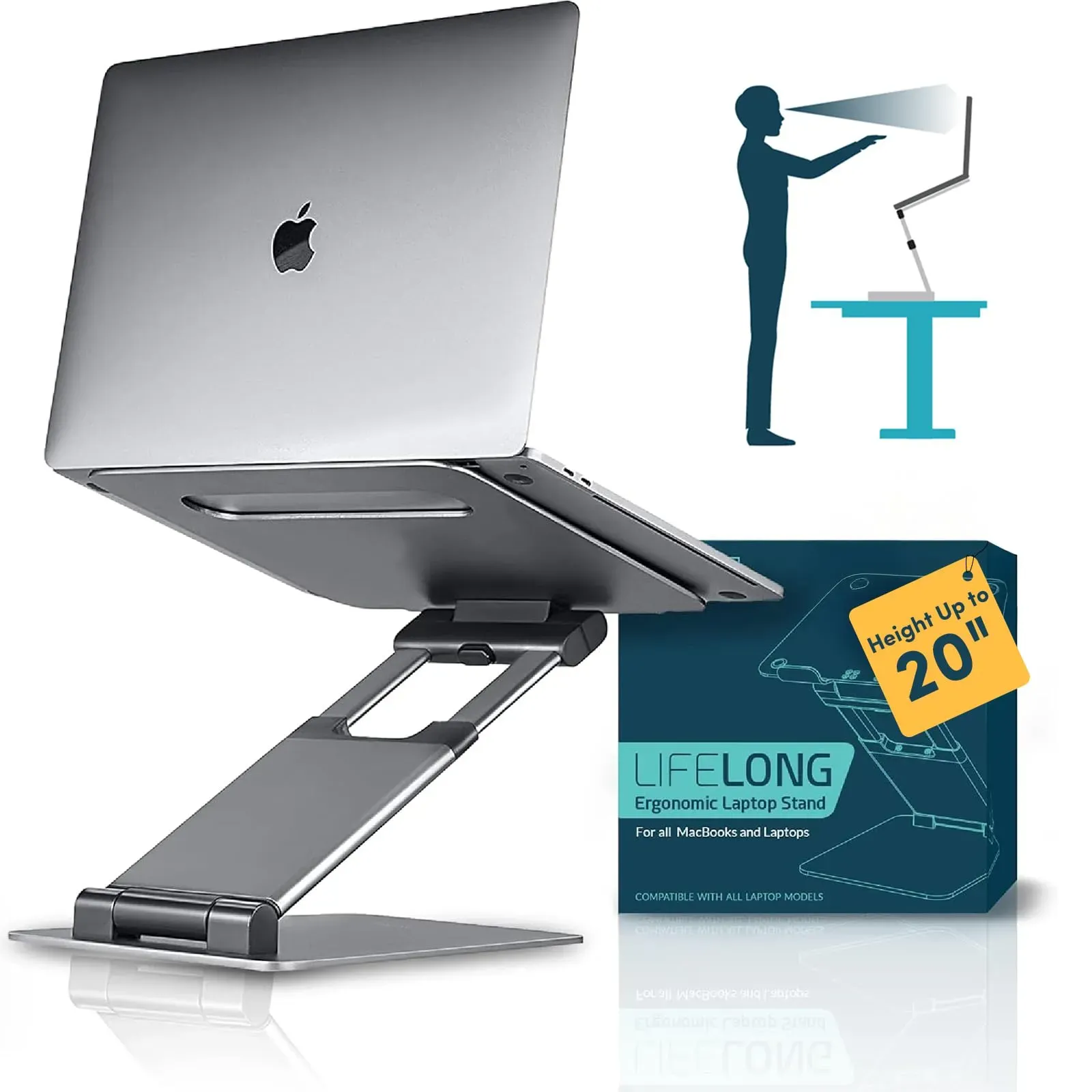
When sitting isn't enough, this one rises to 20 inches for full standing desk conversion.
Price: $69.99 Rating: 4.8/5 Best For: Stand-Up Desk Users Check Price on Amazon
The Lifelong UPRYZE solves a problem most laptop stands ignore: what if you want to stand? Its telescoping arm rises to a full 20 inches. That's double what the Rain Design iLevel 2 (#10) manages, and it turns any fixed desk into a standing workstation. Twenty different arm-length settings let you dial in everything from a slight lift for video calls to full standing height for multi-hour work blocks. It folds flat enough for a backpack, though the metal build adds noticeable weight compared to the Tonmom (#7). For hybrid workers splitting time between sitting and standing without committing to a motorized desk, the Lifelong is the most versatile option in this roundup. Just know you're paying $70 for that flexibility.
Pros
- Rises up to 20 inches from stand floor
- Telescoping arm extends up to 13 inches with 20 settings
- Works with 10-inch tablets through 17-inch laptops
- Folds flat for backpack portability
- Doubles as DJ podium, cookbook stand, or presentation lectern
Cons
- $69.99, one of the pricier options on this list
- Larger footprint when fully extended
- More complex setup than fixed-height stands
Verdict: The clear winner for standing desk converts and anyone who needs extreme height adjustability. Overkill if you only work seated. Save the cash and grab the Bestand (#1) instead.
#3. Psitek Aluminum Vertical Laptop Stand Dock Holder
The vertical orientation that frees your desk without hiding your laptop.
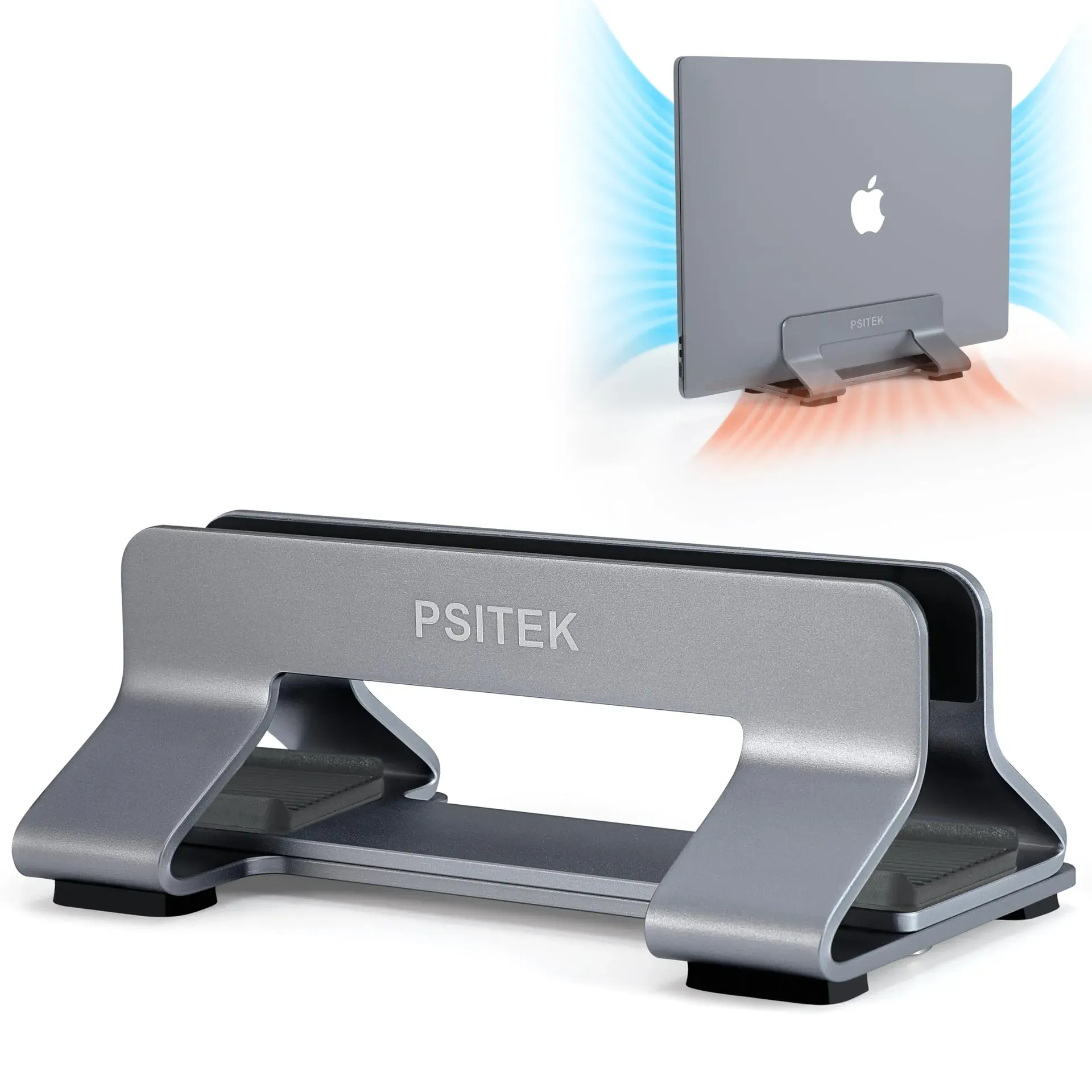
Price: $16.99 Rating: 4.8/5 Best For: Space-Saving Setups Check Price on Amazon
Vertical stands solve a different problem: desk clutter. The Psitek docks your laptop upright, reclaiming the footprint your closed machine would otherwise hog. Its aluminum finish is sandblasted and anodized using the same process as MacBook casings, so it blends in rather than shouting "accessory." The slot adjusts from 12mm to 42mm via quick-release stainless steel screws, so switching between a thin ultrabook and a chunky gaming laptop takes seconds without hunting for a hex key. At $16.99, it is the cheapest aluminum stand on this list by a wide margin. The obvious trade-off: you can't use the laptop while it's docked. This is strictly for decluttering between sessions. Think of it as a companion to a traditional riser like the Bestand (#1), not a replacement.
Pros
- Adjustable slot width from 12mm to 42mm
- Tool-free stainless steel quick-release screws
- Sandblasted and anodized finish matches MacBook aesthetic
- Non-slip silicone pads prevent scratches and sliding
- Vertical orientation improves air circulation and heat dissipation
Cons
- Cannot use laptop while it's docked vertically
- Vertical-only, no horizontal or angled orientation option
- Not a replacement for an active-use ergonomic stand
Verdict: A no-brainer for anyone with limited desk space who docks their laptop to an external monitor. Pair it with any stand on this list for the ultimate clutter-free setup.
#4. Lamicall Adjustable Laptop Stand for Desk for MacBook Air Pro HP 10-17.3''
10,000+ reviews don't lie. This is the people's champion of adjustable laptop stands.
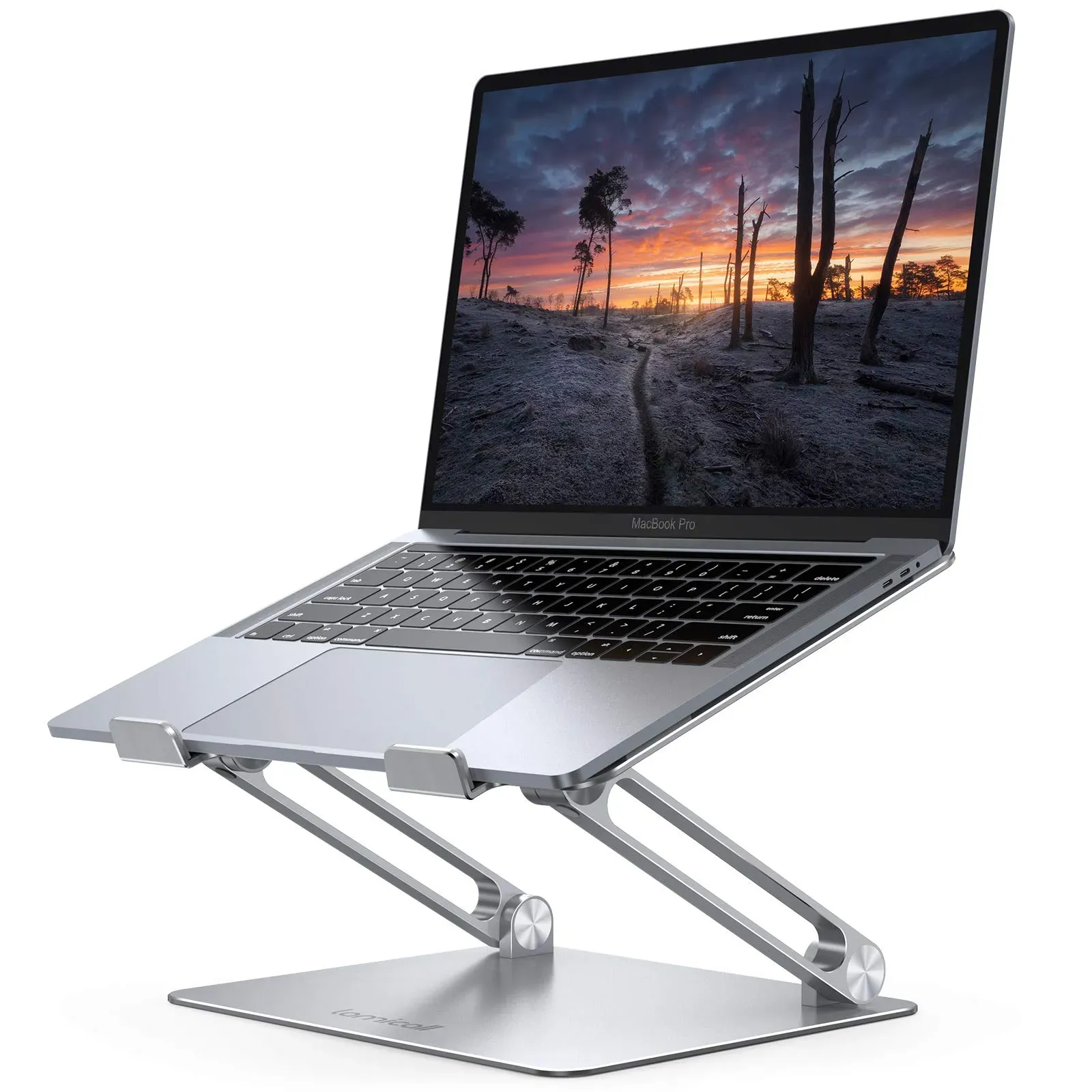
Price: $35.99 Rating: 4.7/5 Best For: Ergonomic Office Workers Check Price on Amazon
With over 10,000 reviews, the Lamicall has more real-world vetting than any adjustable stand in this category. The secret is the base: it is larger and heavier than what you'll find on the Tonmom (#7) or even the pricier Native Union (#6), which translates to zero wobble during aggressive typing. Height and angle both adjust independently, and the whole thing folds flat for travel. Those multiple ventilation holes aren't decorative. They create a legitimate airflow channel under your laptop that the Rain Design mStand (#5) can't match with its solid aluminum design. At $35.99, it splits the price gap perfectly between budget plastic stands and premium metal options. If adjustable ergonomics on a desk is the goal, this is the sweet spot.
Pros
- Compatible with all laptops from 10 to 17.3 inches
- Larger, heavier aluminum alloy base for exceptional stability
- Independent height and angle adjustment
- Folds flat for travel and storage
- Multiple ventilation holes for active airflow and cooling
Cons
- Aluminum is thinner than the Bestand (#1)
- Front support arms can block side ports on thicker gaming laptops
- Larger base footprint than minimalist fixed stands
Verdict: The top-rated adjustable laptop stand for a reason. Buy it if you want proven ergonomics at a fair price. Look at the Native Union (#6) if design matters more than savings.
#5. Rain Design mStand Laptop Stand
The stand that looks like Apple designed it, because it matches every MacBook finish.
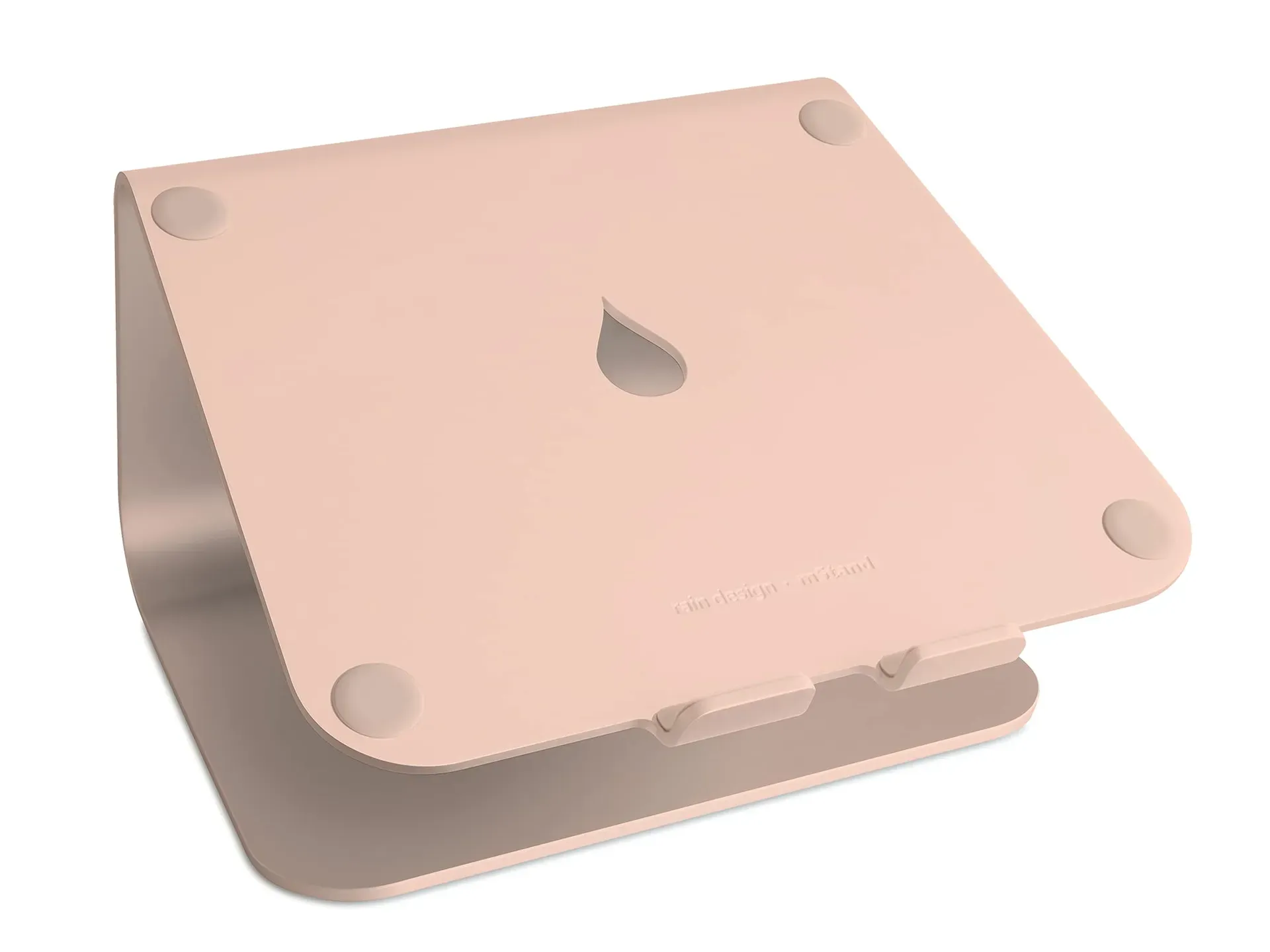
Price: $39.90 Rating: 4.7/5 Best For: Premium Desk Setup Check Price on Amazon
The mStand has been around long enough to earn icon status, and for good reason. That single-piece aluminum slab, available in seven colors matched to Apple's lineup, does double duty as a passive heat sink. It quietly pulls thermal energy away from your MacBook without a single moving part. The fixed 5.9-inch height and 6-degree tilt are non-negotiable, so you either love the position or you don't. What sets it apart from the Bestand (#1) are the thoughtful details: a 2-inch cable routing hole that keeps wires invisible, and a curved cutout underneath that stashes your keyboard when the desk needs to be clear. It is the best-looking stand here, period. If you need adjustability, look at the Lamicall (#4) or Native Union (#6).
Pros
- Single-piece aluminum construction acts as a passive heat sink
- 2-inch cable management hole routes wires cleanly behind the stand
- Keyboard stash underneath clears desk space when not in use
- Available in 7 colors: Silver, Gold, Space Gray, Black, Midnight, and Starlight
- Sand-blasted and anodized finish resists scratches
Cons
- Fixed 5.9-inch height and 6-degree tilt, zero adjustability
- Limited to laptops with depths under 10.4 inches
- Solid aluminum design means no ventilation holes for airflow
Verdict: The undisputed design champion for MacBook users who want a permanent, beautiful desk fixture. Skip it if you need to change your screen height throughout the day.
#6. Native Union Desk Laptop Stand – Height Adjustable Ergonomic Computer Stand
Scandinavian design meets genuine adjustability. Plus a pen holder, because details matter.
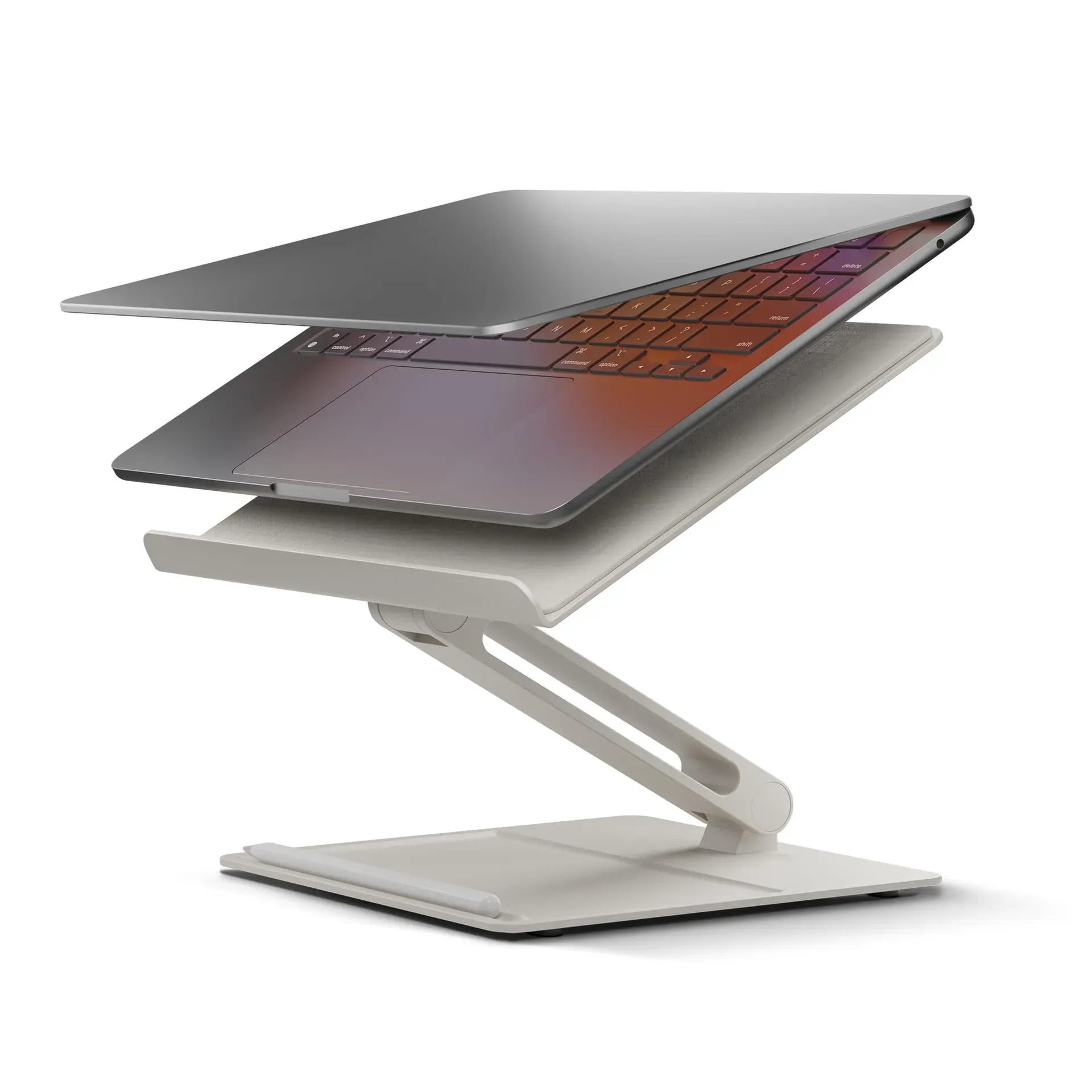
Price: $79.99 Rating: 4.6/5 Best For: Modern Minimalists Check Price on Amazon
The Native Union is what happens when a design studio makes a laptop stand. The fabric-coated surface adds warmth to what would otherwise be cold metal, and the integrated base tray with a pen holder solves the small-clutter problem every desk accumulates. Beneath the aesthetics, the engineering holds up: a heavy metal base with strong hinges keeps the stand planted even at maximum extension, and the non-slip silicone grips inspire more confidence than the Amazon Basics (#8) when adjusting on the fly. Height and angle adjust smoothly rather than in stepped increments. That's a real quality-of-life upgrade over the Branch (#9). At $79.99, you are paying a design premium. For a desk accessory you'll look at every single day, that might be money well spent.
Pros
- Heavy metal base with strong hinges for rock-solid stability
- Fabric-coated surface and matte metal finish
- Integrated base tray with built-in pen holder
- Smooth, non-stepped height and angle adjustment
- Non-slip silicone grips protect laptop and desk
Cons
- $79.99, one of the most expensive stands on this list
- Maximum 15.6-inch laptop support excludes larger models
- Fabric surface requires occasional cleaning to stay looking fresh
Verdict: The best adjustable laptop stand for design-minded professionals who want their workspace to feel curated, not cluttered. Hard to justify if pure function is all you're after.
#7. Tonmom Laptop Stand for Desk, Adjustable Laptop Riser
Nine dollars. Seven height levels. Seventeen thousand reviews. Do the math.
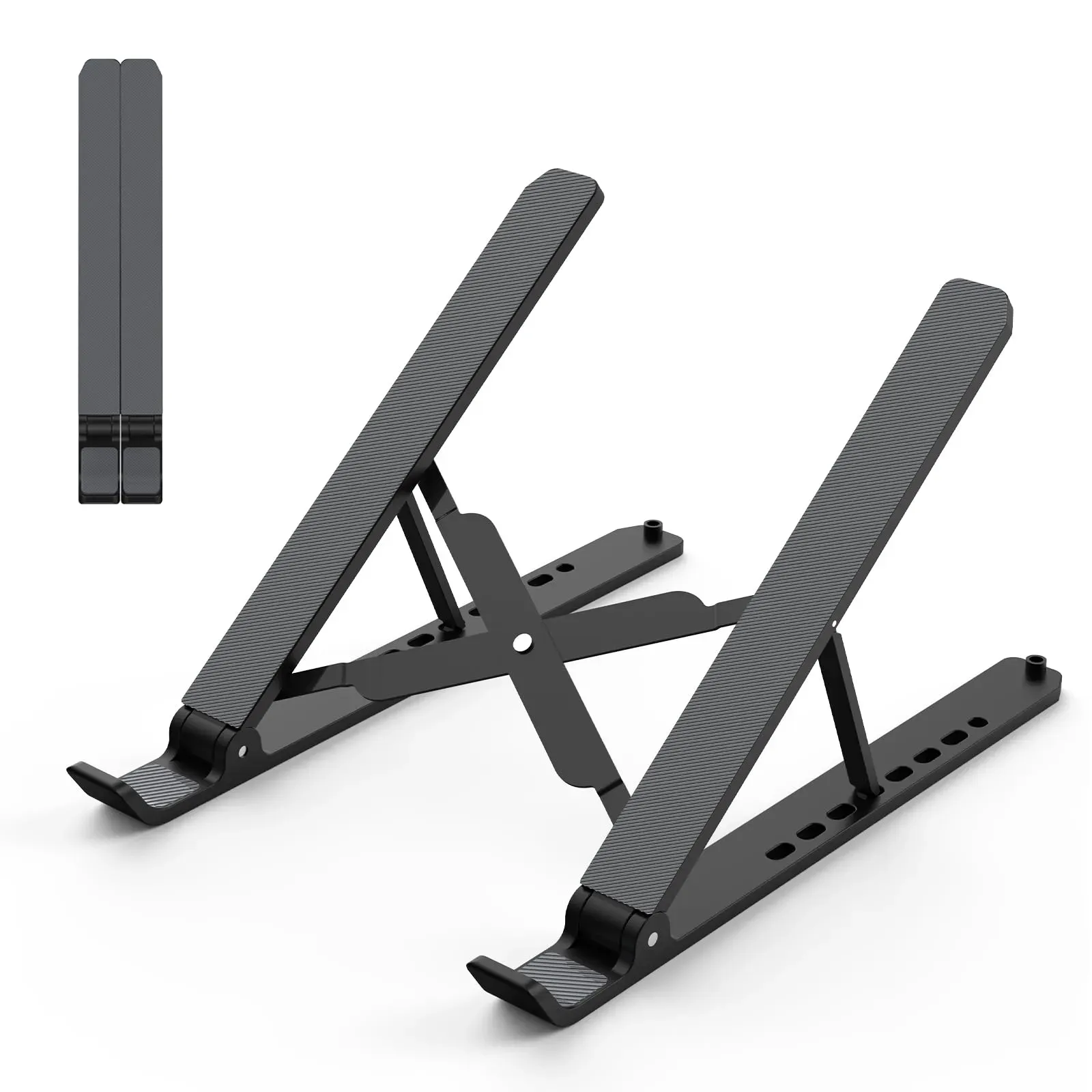
Price: $8.99 Rating: 4.5/5 Best For: Budget Buyers Check Price on Amazon
Seventeen thousand reviews averaging 4.5 stars. At nine dollars. Those numbers shouldn't coexist, but the Tonmom pulls it off. It is not aluminum. The lightweight build keeps costs down. But the triangle support design provides more stability than expected from a half-pound stand. Seven height levels give genuine ergonomic flexibility, and it folds to roughly the size of a pencil case. This is the travel stand, the one you keep in a backpack for coffee shop days or toss in a suitcase for work trips. Compared to the Branch (#9) at nearly nine times the price, the Tonmom doesn't compete on materials. It competes on being the cheapest way to stop hunching over your laptop. In that lane, it has no competition.
Pros
- 7 height levels from 2.78 to 6.5 inches
- Weighs only 0.53 pounds
- Folds to 10.5 x 1.96 x 0.68 inches
- Triangle support design for surprising stability
- Large anti-slip silicone pads protect laptop from scratches
Cons
- Plastic construction, not aluminum like most competitors
- Limited to laptops up to 15.6 inches
- Less stable than heavier metal stands during aggressive typing
Verdict: The ultimate budget pick and the best portable laptop stand for travelers. Not a primary desk stand if you type hard, but unbeatable as a grab-and-go ergonomic solution.
#8. Amazon Basics Sturdy and Portable Ergonomic Laptop Stand for Desk
A laptop stand, breakfast tray, and bedside table walk into a bar…
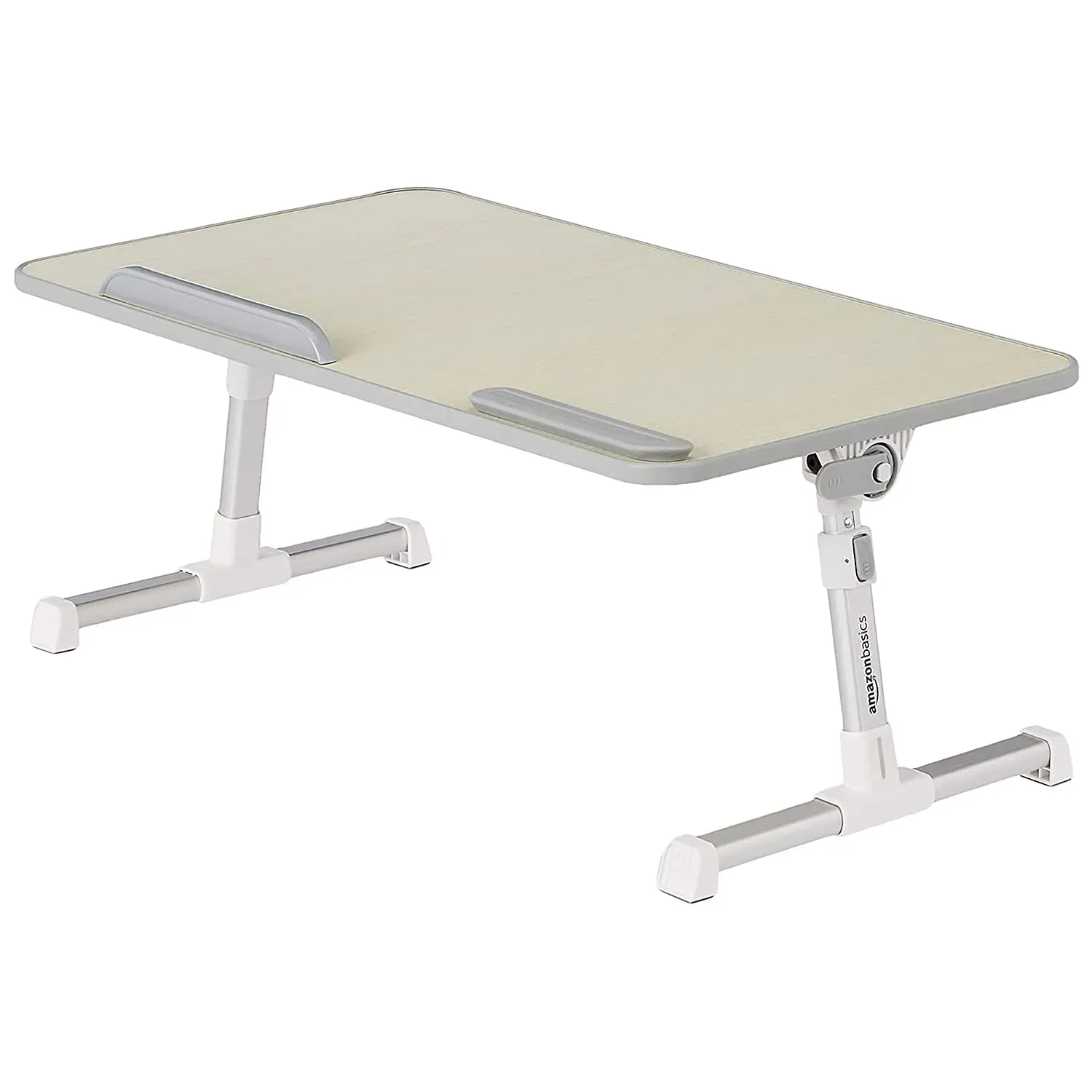
Price: $45.95 Rating: 4.5/5 Best For: Versatile Use Check Price on Amazon
Calling this a laptop stand undersells it. The Amazon Basics stand is closer to a portable desk: a full 20.5 by 11.8 inches of aluminum surface with room for a laptop, a mouse, and still space for a coffee cup. Retractable legs adjust from 9.4 to 12.6 inches and the surface tilts from flat to 36 degrees, so it works equally well at a desk, on a couch, or propped up in bed. A detachable mouse pad and anti-slip strip keep everything from sliding when the angle gets aggressive. It is larger and heavier than anything else on this list. Do not buy this for portability. Buy it because your workspace is wherever you happen to be sitting, and you want one surface that handles all of it.
Pros
- Height adjusts from 9.4 to 12.6 inches
- Tilt range from 0 to 36 degrees
- Large 20.5 x 11.8-inch surface fits laptops up to 17 inches plus a mouse
- Includes detachable mouse pad and anti-slip notebook strip
- Retractable folding legs for storage
Cons
- Bulky and heavy, not suited for travel or commuting
- Industrial aesthetic won't suit design-focused workspaces
- Larger footprint than every other stand on this list
Verdict: The ultimate multi-purpose surface for anyone who works from couches, beds, and desks in equal measure. Skip it if portability matters. This one stays home.
#9. Branch Adjustable Laptop Stand, Portable Wooden Stand
Wood and aluminum. Finally, a laptop stand that doesn't look like industrial equipment.
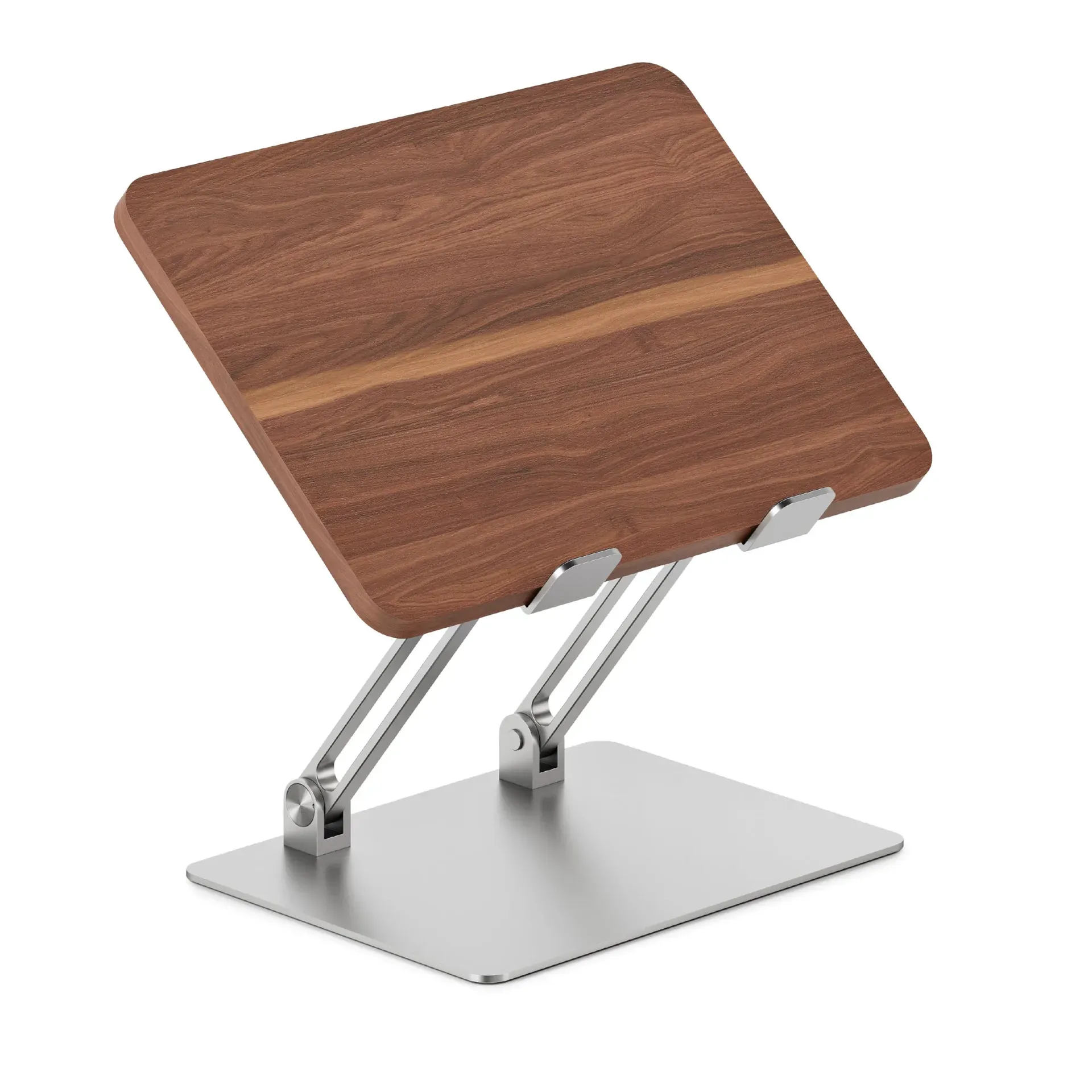
Price: $79.00 Rating: 4.5/5 Best For: Style-Conscious Professionals Check Price on Amazon
The Branch stand bets that you are tired of cold metal. Its MDF wood top, warm to the touch with a natural grain pattern, sits on an anodized aluminum base. The result is the only laptop riser on this list that looks like furniture rather than hardware. Five height steps from 5.5 to 9.5 inches and a 15-degree tilt range keep ergonomics competitive with the Lamicall (#4), though the tilt range is narrower. It folds flat and weighs little enough for daily bag commutes. Where it falls short: at $79, the MDF top is not real hardwood. That feels like a missed opportunity at this price. Still, if your desk needs to look intentional and warm instead of industrial, the Branch is the best-looking adjustable stand available.
Pros
- MDF wood top with anodized aluminum base for a warm aesthetic
- 5 height adjustment steps from 5.5 to 9.5 inches
- Tilt adjustment up to 15 degrees
- Folds completely flat and sets up in seconds without tools
- Secure silicone grips on both top and bottom
Cons
- $79 price tag with MDF, not real hardwood
- 15-degree max tilt is narrower than most adjustable competitors
- Fewer customer reviews than similarly priced alternatives
Verdict: The best laptop stand for a home office where aesthetics matter as much as ergonomics. Hard to recommend over the Lamicall (#4) if pure function drives your decision.
#10. Rain Design iLevel 2 Adjustable Height Laptop Stand
The front slider makes height adjustments so smooth you'll actually change positions during the day.
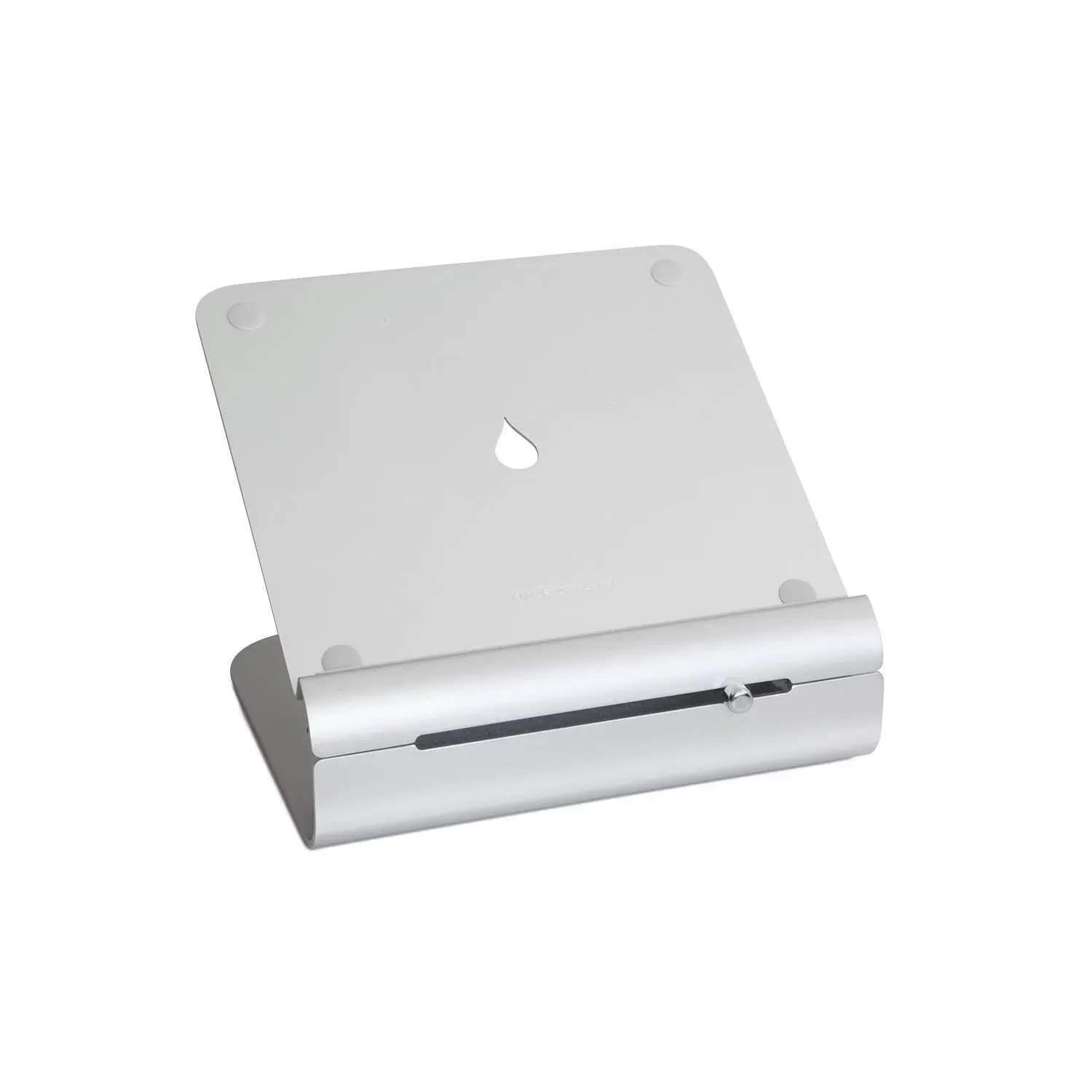
Price: $58.40 Rating: 4.4/5 Best For: Ergonomic Desk Setup Check Price on Amazon
The iLevel 2's party trick is a front-mounted slider that adjusts height smoothly between 5.4 and 7.9 inches. No clicking through preset notches, no loosening knobs. It is the kind of mechanism that encourages micro-adjustments throughout the day as your posture shifts, and that alone justifies the $58.40 price for users who actually change positions. The anodized aluminum finish matches Apple hardware, and rubber pads protect both your laptop and desk from scratches. The catch: this stand is designed exclusively for use with an external keyboard and mouse. If you plan to type directly on your laptop, look at the Lamicall (#4) or Bestand (#1). In a dedicated external keyboard-and-mouse setup where ergonomic flexibility matters, the iLevel 2 is a quiet workhorse.
Pros
- Front slider enables smooth, stepless height adjustment from 5.4 to 7.9 inches
- Anodized aluminum construction matches Apple MacBook finishes
- Rubber pads on top and base protect laptop and desk
- Tilt-forward design aids natural heat dissipation
- Solid build backed by over 1,100 reviews
Cons
- Designed exclusively for use with external keyboard and mouse
- Height range is limited compared to the Lifelong UPRYZE (#2)
- $58.40 sits in an awkward middle ground between budget and premium
Verdict: A premium adjustable stand for dedicated desk setups with external peripherals. Awkward if you type on your laptop directly; brilliant if you don't.
How to Choose the Best Laptop Stands in 2026
Picking the right laptop stand comes down to three things: how you work, where you work, and what you're willing to spend. Here's what actually matters when comparing options.
Fixed vs. adjustable laptop stands: which one fits your workflow?
Fixed stands like the Rain Design mStand (#5) and Bestand (#1) are simpler, sturdier, and often better at passive cooling since they use a single thick piece of metal. They are ideal if you work at one desk, at one height, and just want to elevate your screen to eye level. Adjustable stands like the Lamicall (#4) and Lifelong (#2) give you flexibility: different heights for sitting versus standing, or different angles for video calls versus focused work. The trade-off is usually a slight reduction in stability and a higher price. If you move between sitting and standing throughout the day, an adjustable stand pays for itself in comfort within the first week.
Materials matter: aluminum, plastic, or wood?
Aluminum dominates this category for good reason: it is rigid, lightweight, and naturally dissipates heat. The grade of aluminum matters too. The Bestand (#1) uses 7000-series alloy (aerospace grade), while most competitors use 6000-series. Plastic stands like the Tonmom (#7) sacrifice durability and heat management for portability and an unbeatable price. Wood-topped options like the Branch (#9) trade some thermal performance for a warmer, more residential aesthetic. For a permanent desk setup, aluminum is the clear winner. For travel, plastic makes more sense.
Cooling and ventilation: does it actually help?
Yes, but not all cooling designs are equal. Passive cooling (solid aluminum acting as a heat sink, like the mStand) works well for everyday tasks. Active ventilation (hollow designs with airflow channels, like the Bestand and Lamicall) provides better cooling for sustained heavy workloads like video editing or gaming. The worst thermal situation is a laptop flat on a desk with zero airflow underneath. Any stand on this list improves on that baseline, but if your machine runs hot under load, prioritize stands with ventilation cutouts.
Price vs. value: where to spend and where to save
The $9 Tonmom (#7) and the $79 Native Union (#6) both lift your laptop off the desk. The difference is in materials, adjustability, and aesthetics, not core function. If you need a basic ergonomic lift and nothing more, the budget picks deliver. Step up to the $35 to $40 range (Bestand, Lamicall, mStand) and you get thicker aluminum, better cooling, and more polished designs. Above $60, you are paying for brand identity, unique materials, or specialized features like the Lifelong's 20-inch standing height. None of these are bad purchases. Just know what you're actually paying for.
Frequently Asked Questions About Laptop Stands
Are laptop stands worth it?
Absolutely. A laptop stand is one of the cheapest ergonomic upgrades you can make. For as little as $9 (the Tonmom (#7)), you can raise your screen to eye level, reduce neck strain, and improve airflow under your laptop. Considering most people spend 6 to 8 hours a day looking at their screen, the cost-per-hour math is hard to argue with.
Are laptop stands good for posture?
Yes, when used correctly. The ideal ergonomic position places the top of your screen at or slightly below eye level, which prevents the forward head tilt that causes neck and shoulder pain. Stands like the Lamicall (#4) and Native Union (#6) let you dial in that position precisely. Just pair your stand with an external keyboard and mouse. Typing on an elevated laptop creates wrist strain that defeats the purpose.
Do laptop stands help with cooling?
Yes, and sometimes dramatically. A laptop flat on a desk traps heat against the surface. Any stand that creates an air gap underneath improves convection cooling. Stands with ventilation holes like the Bestand (#1) and solid aluminum heat sinks like the Rain Design mStand (#5) go a step further, actively pulling heat away from the chassis. For gaming or video rendering, this can prevent thermal throttling and extend component lifespan.
What's the best laptop stand for a home office setup?
For a dedicated home office, the Lamicall (#4) and Bestand (#1) are the top-rated laptop stands that balance ergonomics, build quality, and price. If aesthetics matter more, the Branch (#9) adds warmth with its wood top, while the Rain Design mStand (#5) delivers the cleanest aluminum look. For standing desk users, the Lifelong (#2) is unmatched at 20 inches of height.
Can I use a laptop stand for gaming?
Yes, and you probably should. Gaming laptops run hot, and a stand with ventilation like the Bestand (#1) or Lamicall (#4) improves airflow and reduces thermal throttling during extended sessions. Just make sure the stand supports your laptop's size and weight. Gaming machines tend to be larger and heavier than ultrabooks. The Lamicall handles up to 17.3 inches, making it the safest bet for most gaming rigs.
Final Verdict: The Best Laptop Stand of 2026
The Bestand Aluminum Cooling Stand (#1) is the best laptop stand of 2026 for most people. Aerospace-grade aluminum, exceptional heat management, and a price that undercuts stands with half its build quality. The Lifelong UPRYZE (#2) is the clear choice if you need standing-desk height from a portable stand, and the Lamicall (#4) remains the most trusted adjustable option with over 10,000 reviews backing its stability. Every stand on this list solves the core problem: getting your screen to eye level and your posture out of the gutter. Which one fits your desk is really about whether you value materials, adjustability, portability, or pure style. Prices shift, so check current Amazon listings before you buy.